Covary Has Moved Beyond Google Colab
If you have previously used Covary through Google Colab, you may remember a workflow involving a Jupyter notebook, Google Drive mounting, GPU configuration, notebook parameters, and several sequential execution steps.
That is no longer the easiest way to use Covary.
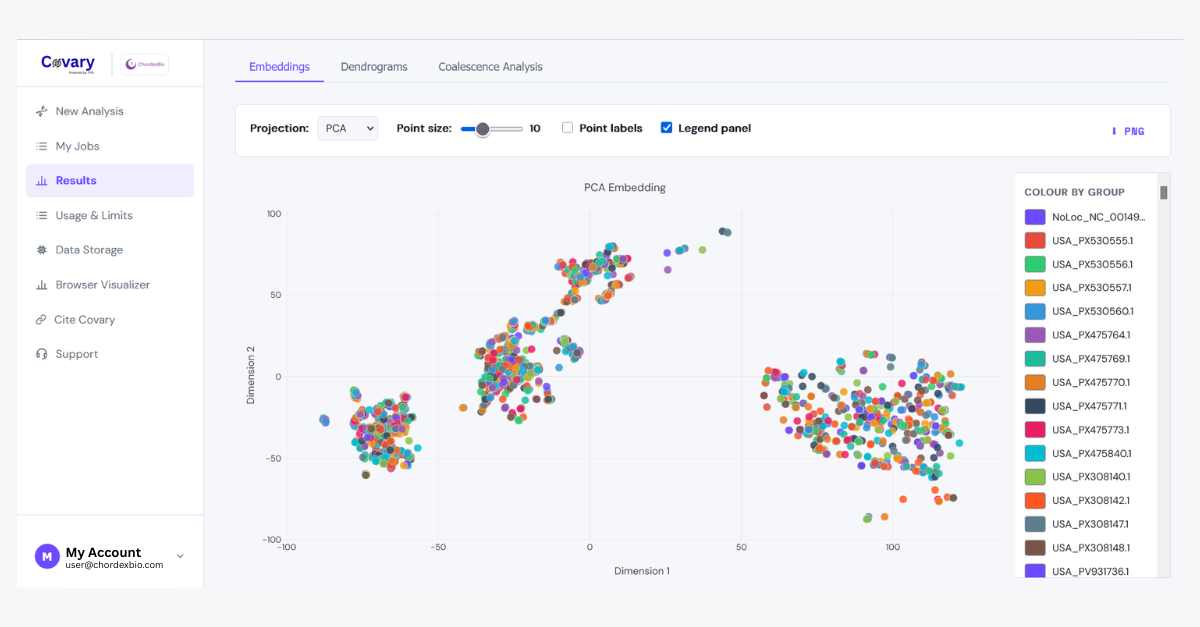
Covary V3 provides a direct web interface where you can prepare an analysis, provide your FASTA dataset, run the Covary pipeline, and inspect your results without manually configuring a Google Colab runtime.
This guide replaces the older Colab-centered workflow with the current Covary V3 web workflow.
What Is Covary?
Covary is a machine-learning framework for large-scale biological sequence analysis. It uses alignment-free, translation-aware sequence representations to compare and analyze genetic sequences without requiring traditional multiple sequence alignment.
Instead of first aligning every sequence nucleotide-by-nucleotide, Covary transforms sequences into numerical representations that can be compared computationally.
The resulting representations can be used to explore sequence similarity, clustering, embeddings, and phylogenomic structure.
Covary is powered by TIPs-VF, ChordexBio's translation-aware sequence representation framework.
The Covary V3 platform provides a browser-based interface for running these analyses and reviewing their results.
What You Can Do With Covary V3
Covary is designed for large-scale biological sequence analysis and can be used for a variety of exploratory and research workflows.
- Alignment-free sequence comparison
- Phylogenomic exploration
- Sequence clustering
- Translation-aware embedding analysis
- Taxonomic exploration
- Pathogen and microbial sequence analysis
- Metagenomic exploration
- Large-scale comparative genomics
The Covary platform generates several forms of output that help researchers examine the structure of their sequence dataset.
Before You Start
The most important thing you need is a multi-FASTA file containing the sequences you want to analyze.
A multi-FASTA file contains multiple sequence records. Each record begins with a header line starting with >, followed by the corresponding DNA sequence.
For example:
>sequence_001
ATGCGTACGATCGATCGATCGATCG
>sequence_002
ATGCGTACGATCGATCGATCGATCA
>sequence_003
ATGCGTACGATCGATCGATCGATCC
Each sequence should have a meaningful identifier in its header.
Recommended FASTA preparation
- Use one sequence per FASTA record.
- Give every sequence a unique and informative identifier.
- Keep the biological scope of the dataset consistent.
- Avoid accidentally merged or empty sequence records.
- Remove unnecessary formatting or hidden characters.
- Document important preprocessing decisions before analysis.
For the most interpretable analyses, compare sequences that represent a meaningful biological scope—for example, homologous genes, related viral genomes, bacterial genomes, or another clearly defined sequence collection.
Step 1 — Open Covary V3
Go to the official Covary website:
https://covary.chordexbio.com/
Select the option to access Covary V3 and sign in to the application.
Once inside the application, the main navigation includes several sections, including:
- New Analysis — start a new Covary run.
- My Jobs — monitor previous and active analyses.
- Results — inspect completed analyses.
- Usage and Limits — review your current usage.
For this tutorial, select New Analysis.
Step 2 — Create a New Analysis
The New Analysis page is where you provide the FASTA dataset that Covary will process.
You can identify your analysis with an optional Project title.
A useful project title should tell you what the dataset represents.
For example:
Influenza H3N2 — Southeast Asia 2024
or:
Thermus 16S — Comparative Analysis
A descriptive title is especially useful when you perform multiple analyses and later need to locate a particular run in My Jobs.
Step 3 — Provide Your FASTA Dataset
Covary V3 supports two ways of providing your FASTA dataset:
- Paste URL
- Upload File
Option A — Paste a FASTA URL
If your FASTA file is already hosted online and your account has URL input enabled, you can provide the file directly using its shareable URL.
Covary V3 supports common sources such as:
- GitHub
- Google Drive
- Dropbox
- OneDrive
- Zenodo
- Figshare
The important requirement is that the URL should resolve to the actual FASTA content rather than an HTML preview page.
For example, a GitHub repository page containing a FASTA file is not necessarily the same as a raw file URL.
Option B — Upload a FASTA File
You can also upload the FASTA file directly from your computer.
Select Upload File, then drag your FASTA file into the upload area or click the file selector.
Covary accepts common FASTA extensions including:
.fasta
.fa
.fna
.ffn
.faa
.frn
If you are working with a dataset that is already on your computer, direct upload is usually the simplest option.
Step 4 — Decide How to Handle Non-ATCG Characters
Covary V3 includes a setting for sequences containing characters outside the standard DNA alphabet A, T, C, and G.
You can choose between:
- Exclude — exclude sequences containing non-A/T/C/G characters.
- Include — retain those sequences and replace non-A/T/C/G characters with
N.
The default is Exclude.
This decision matters when working with real-world sequencing data because FASTA files may contain ambiguous nucleotide symbols such as N or other IUPAC ambiguity codes.
If your dataset contains ambiguous sequences, consider why those characters are present before choosing how to handle them. Document the decision in your experimental notes so that the analysis remains reproducible.
Step 5 — Run Covary
Once your FASTA input and sequence-handling option are ready, start the analysis.
For URL-based input, select:
Run Covary
For uploaded files, select:
Upload & Run
Covary will queue and process the analysis on its computational infrastructure.
This is one of the biggest differences from the previous Google Colab workflow.
You do not need to:
- Open Google Colab.
- Mount Google Drive.
- Select a T4 GPU.
- Edit notebook cells.
- Copy files into
/content/. - Run notebook cells sequentially.
- Manually package the output from a Colab session.
Covary V3 handles the pipeline execution after you submit the analysis.
Step 6 — Monitor Your Analysis
After submitting a run, open My Jobs to monitor your analysis.
The My Jobs section is designed to keep track of Covary pipeline runs and their completion status.
This is particularly useful when working with multiple datasets because you can return to the application without having to keep a browser notebook session open.
Step 7 — Open Your Results
When the analysis is complete, go to Results.
The Results page allows you to select a completed Covary job and inspect the outputs generated by the analysis.
Covary results can include:
- Sequence embeddings
- Distance information
- Dimensionality-reduction outputs
- Dendrograms
- Metadata and analysis information
- Downloadable raw result files
The exact presentation of results depends on the completed analysis and the available result data.
Understanding the Embeddings
Covary provides dimensionality-reduction views including PCA, t-SNE, and UMAP.
PCA
Principal Component Analysis (PCA) provides a lower-dimensional representation of the data that can help reveal broad structure, major variation, and potential outliers.
If sequences form visibly separated groups in PCA space, this may indicate systematic differences in their sequence representations.
t-SNE
t-SNE is designed to emphasize local neighborhoods in high-dimensional data.
It can be useful for exploring whether sequences form local clusters, but distances between distant groups should not be interpreted as straightforward biological distances.
UMAP
UMAP provides another way to visualize high-dimensional representations. It can reveal compact neighborhoods and broader structural patterns in a dataset.
As with other dimensionality-reduction methods, UMAP should be treated as an exploratory representation rather than a direct phylogenetic tree.
Understanding Distance Matrices
Covary also generates distance information describing relationships among sequence representations.
A distance matrix can be visualized as a heatmap, where each cell represents the calculated distance between a pair of sequences.
Sequences that are more similar in the representation space will generally have smaller distances, while more dissimilar sequences will have larger distances.
Distance matrices are useful for:
- Exploring sequence similarity.
- Identifying groups of related sequences.
- Inspecting outliers.
- Supporting downstream clustering.
- Generating additional visualizations.
Understanding Dendrograms
Covary can also present hierarchical clustering results as dendrograms.
A dendrogram provides a tree-like representation of how sequences are grouped based on their distances in the analysis space.
When interpreting a dendrogram, pay attention to which sequences cluster together and whether those groupings are consistent with your biological expectations.
For example, if sequences from the same known species consistently group together while unrelated sequences remain separated, that provides useful evidence that the representation is capturing meaningful structure in the dataset.
However, dendrograms produced from computational similarity should be interpreted as part of a broader analysis rather than treated as unquestionable evolutionary truth.
Step 8 — Download the Raw Results
Covary V3 provides downloadable result files from the Results interface.
Use Raw files when you need the generated embedding and linkage data for downstream analysis.
Use Raw distances when you need the distance matrices associated with the analysis.
These numerical outputs can be useful if you want to:
- Perform additional analysis in Python or R.
- Create custom visualizations.
- Archive numerical results.
- Compare Covary outputs with another computational method.
- Perform downstream statistical analysis.
Working With Large Result Files
Some Covary outputs may become too large for convenient inline visualization.
Covary V3 includes a Browser Visualizer for supported accounts that allows downloaded TSV result files to be explored locally in the browser.
The Browser Visualizer can work with embedding and distance TSV files and can provide local visualizations and analyses without sending the selected files back to Covary.
This is particularly useful when a result is too large for the normal inline visualization interface.
From the Old Colab Workflow to Covary V3
If you previously followed one of ChordexBio's older Covary tutorials, the difference can be summarized like this:
| Old Covary Workflow | Covary V3 |
|---|---|
| Google Colab notebook | Web application |
| Manual notebook setup | Web-based analysis interface |
| Google Drive mounting | Upload a file or provide a supported URL |
| Manual GPU selection | Cloud execution handled by Covary |
| Edit notebook parameters | Configure analysis through the application |
| Run notebook cells | Run Covary directly |
| Download from Colab Files | Download results from the Results interface |
| Manage notebook sessions | Track analyses through My Jobs |
The older Colab workflow remains useful for users who specifically want to work with the underlying notebook-based pipeline. However, Covary V3 is the recommended starting point for users who simply want to run Covary analyses through a web interface.
Common Problems and Troubleshooting
My FASTA file is rejected
Check that the file is a valid FASTA file and that each sequence record begins with a > header.
Also check for empty records, malformed headers, or unexpected formatting.
My URL does not work
Make sure the URL points to the actual FASTA file rather than an HTML preview page.
For repositories such as GitHub, use the raw file URL when available.
I have sequences containing ambiguous bases
Review the Non-ATCG characters option. The default behavior excludes sequences containing characters outside A/T/C/G, while the Include option replaces non-A/T/C/G characters with N.
My analysis is taking a while
Check My Jobs for the current status of your run. Processing time depends on the size and characteristics of the dataset as well as available compute capacity.
My results are too large to visualize
Download the raw TSV outputs and, if your account supports it, use Covary's Browser Visualizer for local exploration.
How to Design a Good Covary Dataset
The quality of a Covary analysis depends not only on the computational pipeline but also on the biological design of the dataset.
Before submitting a run, ask:
- What biological question am I trying to answer?
- Are the sequences biologically comparable?
- Are the sequence headers informative?
- Do I have enough representative sequences for the question?
- Are there obvious sequencing or preprocessing artifacts?
- Will the observed clusters have meaningful biological context?
For example, mixing unrelated genes, highly different sequence types, or poorly defined sample groups may produce patterns that are computationally interesting but biologically difficult to interpret.
A good Covary analysis therefore begins with thoughtful dataset construction.
Interpreting Covary Results Responsibly
Covary is designed to help researchers explore biological sequence relationships at scale. Its outputs should be interpreted together with biological knowledge, sample metadata, sequence provenance, and independent validation.
An embedding cluster does not automatically establish a species boundary. A dendrogram does not automatically prove evolutionary ancestry. A distance does not necessarily correspond to a conventional evolutionary distance used by a particular phylogenetic model.
Instead, Covary provides a computational representation of sequence relationships that can be investigated alongside other evidence.
This distinction becomes especially important when analyzing unfamiliar organisms, highly divergent sequences, metagenomic datasets, or datasets with substantial technical variation.
Why Covary V3 Matters
One of the goals of Covary V3 is to make large-scale genomic intelligence more accessible without requiring every researcher to become a specialist in computational infrastructure.
The transition from a notebook-centered workflow to a web application removes several layers of technical setup:
- No local Python environment is required.
- No manual Google Drive mounting is required.
- No Colab GPU configuration is required.
- No notebook cells need to be edited for a standard analysis.
- Jobs can be tracked through the application.
- Results can be reviewed and downloaded from the web interface.
This makes Covary easier to approach for researchers who are primarily interested in the biological question rather than the mechanics of setting up a machine-learning runtime.
Covary and ChordexBio
Covary is part of the broader ChordexBio research ecosystem exploring how machine learning can be applied to biological sequence analysis.
The framework is powered by TIPs-VF, a translation-aware sequence representation approach developed to capture biological information from variable-length genetic sequences.
Together, these technologies explore an alternative to conventional alignment-first workflows by representing sequences computationally and analyzing relationships in representation space.
Quick Start Checklist
Before starting your first Covary V3 analysis, use this checklist:
- ✓ Prepare a valid multi-FASTA file.
- ✓ Give each sequence a meaningful identifier.
- ✓ Make sure the sequences represent a coherent biological dataset.
- ✓ Open Covary V3 and sign in.
- ✓ Select New Analysis.
- ✓ Add an optional project title.
- ✓ Upload the FASTA file or provide a supported FASTA URL.
- ✓ Decide how to handle non-ATCG characters.
- ✓ Select Run Covary or Upload & Run.
- ✓ Monitor the analysis in My Jobs.
- ✓ Open Results when the analysis is complete.
- ✓ Examine embeddings, distances, and dendrograms in biological context.
- ✓ Download raw results when downstream analysis is needed.
Final Takeaway
If you learned Covary through the older Google Colab tutorials, the most important update is simple:
You no longer need to start with Google Colab.
Covary V3 provides a direct web-based workflow for submitting FASTA datasets, running alignment-free sequence analysis, tracking jobs, exploring results, and downloading numerical outputs.
The underlying research direction remains the same: use machine learning and translation-aware representations to explore biological sequence relationships without making traditional multiple sequence alignment the required first step.
For new users, Covary V3 is the recommended starting point.
→ Start an analysis with Covary V3
Hi, I’m Dexter 😎 I handle resource management at ChordexBio—building tutorials, guides, and technical content that actually make sense. I like breaking down complex ideas into clear, usable write-ups, whether it’s for onboarding, research workflows, or product documentation.